Certified Acrobat Pro Document Editor – Edit, Convert, Perfect Any PDF
Need a professional Acrobat Pro document editor who goes beyond basic tools? 2nur uses Adobe Acrobat Pro (and advanced plugins) to edit text, images, forms, and metadata inside any PDF — preserving original layout, fonts, and interactive elements.
Whether you have scanned contracts, damaged files, password-protected documents (with permission), or complex reports, our Acrobat Pro document editor service delivers results that look untouched by editing. We fix, rewrite, restructure, and optimize PDFs faster than DIY software.
📑 Professional PDF Editing Suite
Acrobat Pro Expert1. What a Pro Acrobat Pro Document Editor Can Do
With native Adobe Acrobat Pro and years of expertise, our Acrobat Pro document editor handles tasks that regular software breaks: multi-column layouts, embedded fonts, live form fields, digital signatures, and scanned image layers. We don't convert to Word — we edit the PDF directly.
- 📝 Rewrite, add, or delete any text block (including headers/footers)
- 🖼️ Replace, resize, or crop images while keeping text flow
- 📋 Edit interactive forms: checkboxes, dropdowns, signature fields
- 🔗 Update hyperlinks, bookmarks, and cross-references
- 📎 Redact sensitive content permanently
- 🗂️ Merge, split, reorder pages with text continuity
2. Simple Pricing Based on Task
Small typos, date changes, minor word edits
Multiple text changes, image swap, form field updates
Full restructure, OCR correction, redaction, layout repair
⚡ Rush (2–4h) +50% | Complex files quoted separately | One free revision round included
3. Our Acrobat Pro Editing Workflow
- 📎 Upload PDF + annotated instructions (text changes, layout notes).
- 🔍 Deep analysis – fonts, security, form fields, image layers.
- ✍️ Pro editing – using Adobe Acrobat Pro + Enfocus PitStop for precision.
- ✅ Review link – you inspect (watermarked draft) and request tweaks.
- 📥 Final PDF – ready with all changes, no quality loss.
4. Why Hire a Dedicated Acrobat Pro Document Editor?
Free online editors break formatting, remove fonts, and flatten fields. A skilled Acrobat Pro document editor preserves every design element while making changes you request — even in complex files like government forms, technical manuals, or interactive brochures. We also advise on accessibility (tagged PDFs) and print compliance.
5. Acrobat Pro Expert vs. Free Editors
Destroy fonts, add watermarks, max edits limited, no forms support.
Unlimited edits, perfect fidelity, forms, signatures, OCR, any complexity.
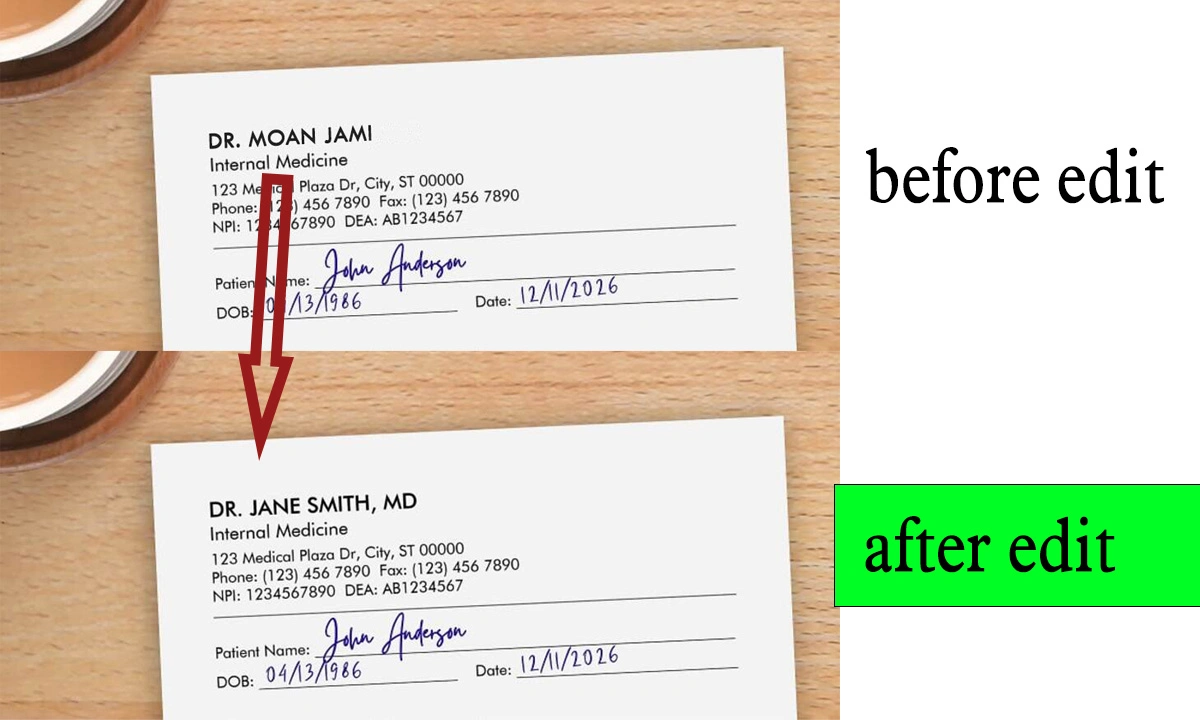
6. Real Results: Before & After Acrobat Pro Editing
From garbled OCR scans to polished, text-editable documents. We rebuild tables, correct misaligned columns, and restore missing characters.
7. How Expert PDF Editing Benefits Your Business
- 📑 Update contracts, invoices, and reports without recreating
- ⏱️ Save hours of manual retyping or reformatting
- 💼 Impress clients with flawless, branded documents
- 🔐 Securely redact confidential info before sharing
- 🌍 Make PDFs accessible (section 508 / WCAG ready)
8. Editing Policy & Confidentiality
- 🔒 100% confidential – NDA available on request
- 📁 Secure transfer & storage (deleted after 30 days)
- 🚫 No editing of illegal, forged, or deceptive documents
- 🔓 Password-protected PDFs accepted only with written consent
9. Hire an Acrobat Pro Document Editor – From $10
Send via WhatsApp, email, or cloud link. We reply within 2 hours with a fixed price and delivery estimate.
Portfolio & details: 2nur.com | Contact Page
💰 $10 – $30 flat rates
⚡ Same-day rush
10. FAQs – Acrobat Pro Document Editor
Basic tools often break formatting, rasterize text, or can't handle forms. An Acrobat Pro expert edits natively, preserving fonts, fields, and signatures.
Only if you provide the password or proof of ownership. We respect copyright and security policies.
Yes, those are base rates for standard PDF editing tasks. Complex technical files or heavy image edits may cost a bit more — we quote upfront.
Standard turnaround 24–48h. Rush service (under 4h) available for +50%.