Photoshop PDF Editing for Clean Text, Image, and Layout Fixes.
Need reliable photoshop pdf editing? Some PDF changes need more than a basic PDF editor. When the page is flattened, scanned, image-heavy, or visually complex, Photoshop-style editing helps repair text areas, backgrounds, images, shadows, spacing, and layout details with precision.
At 2nur Digital, I edit PDF pages visually so the final result looks natural and polished. Whether you need text replaced, an image adjusted, a background cleaned, a scanned PDF repaired, or a layout rebuilt, I focus on making every edit blend with the original document.
If you want to understand PDF editing basics, Adobe's PDF editing guide is useful, and Adobe's Photoshop PDF guide explains how Photoshop can work with PDF files. But when you need the actual Photoshop PDF edit done cleanly — that's where we come in.
📑 Everything We Cover Here
Photoshop PDF editing guide1️⃣ Why Photoshop PDF Editing Helps
When someone needs photoshop pdf editing, the file is usually not a simple editable document. It may be scanned, flattened, image-heavy, or designed with visual elements that need careful retouching rather than basic typing.
Photoshop-style PDF editing is useful when text sits inside an image, a background has to be rebuilt, a logo or photo needs adjustment, or a scanned page needs to look cleaner after changes. The edit must blend into the existing page instead of looking pasted on top.
That means the work is visual. Text replacement, image repair, color matching, shadow cleanup, background reconstruction, and final export quality all have to be handled together.
For the technically curious, Adobe's PDF editing guide is a useful starting point, and Adobe's Photoshop PDF guide explains how Photoshop can save and handle PDF files.
- Is the PDF editable, flattened, scanned, or image-based?
- Does the edit involve text replacement, image repair, or layout rebuilding?
- What font style, color, spacing, and background texture must be matched?
- Are there shadows, marks, blur, compression blocks, or scan damage to clean?
- Should the final file stay as PDF or be exported to image, Word, or another format?
- Does the document need visual retouching, OCR support, or both?
- A clean photoshop pdf editing workflow answers these questions before a single visible change is made.
3️⃣ How Our Photoshop PDF Editing Process Works
I keep the workflow simple and transparent. Here's what happens when you request photoshop pdf editing:
- PDF review comes first. I inspect whether the file is editable, flattened, scanned, or image-based before confirming the final timeline.
- Visual repair planning comes next. I identify text areas, image sections, background texture, shadows, spacing, and any scan damage that needs cleanup.
- Then I match the visible design. I check font style, line spacing, colors, margins, alignment, and texture so new edits blend with the original PDF.
- The Photoshop edit happens carefully. I replace or correct the requested content, retouch surrounding areas, and rebuild the page so it does not look patched.
- Final quality review. I zoom in, compare the edited area with the rest of the PDF, then export the final file in your preferred format.
This process is why automated tools often fail when you need photoshop pdf editing that looks clean. Software can make basic changes, but it usually cannot make the visual judgment calls that a human editor can.
4️⃣ Why People Trust Our Photoshop PDF Editing Work
Honestly, it comes down to experience and care. I have worked on flattened PDFs, scanned pages, image-heavy files, forms, letters, certificates, business documents, and multi-page PDF projects for years. Every visual PDF edit is different, so I do not treat this like a one-click conversion job.
When you reach out, you're talking directly to me. No middlemen, no chatbots, no automated responses. I typically reply within 60 seconds if I'm at my desk. We discuss your PDF, I review the file quality, and I give you an honest answer about what can be edited cleanly.
Some PDFs only need small text replacement. Others need Photoshop retouching, background repair, image cleanup, scan correction, page straightening, or full layout reconstruction. Each project gets the same careful attention regardless of size.
5️⃣ Basic PDF Tools vs Photoshop Editing
They can handle simple selectable text, but they often fail on flattened, scanned, or image-heavy PDFs. The result may shift spacing, damage backgrounds, or make the edit look pasted on top.
A real editor checks the text, rebuilds the layout, retouches the background, matches visual details, and exports the PDF correctly. That's the difference when you need photoshop pdf editing done properly.
6️⃣ See a Real Photoshop PDF Editing Example
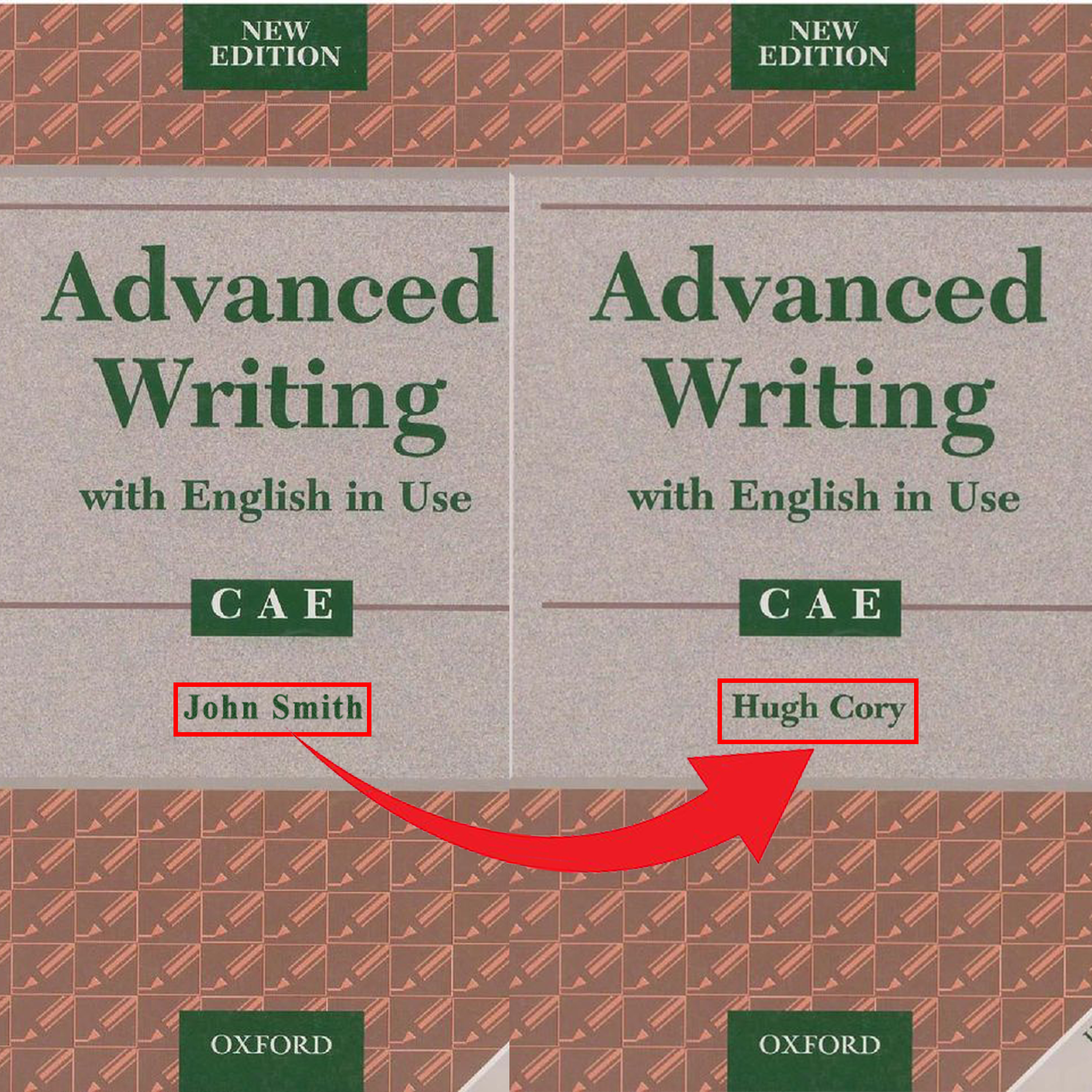
Here's a before-and-after style example from PDF editing work. The goal with every photoshop pdf editing project is to make the corrected area blend naturally with the rest of the page — same tone, same spacing, same PDF feel.
Want to learn more about PDF editing and Photoshop export? Check out Adobe's PDF editing guide and Adobe's Photoshop PDF guide for deeper insight.
7️⃣ So Is Photoshop PDF Editing Worth It?
Look, I've seen what happens when people try to save time with a free converter or basic PDF editor. The text may change, but the background breaks, fonts look wrong, spacing shifts, or the edited area looks obvious.
When you pay for photoshop pdf editing, you're paying for both technical cleanup and visual judgment. The PDF comes back looking cleaner, easier to read, and more natural because every detail is checked manually.
- No more PDF files that look patched, shifted, or poorly edited
- Cleaner text replacement, image cleanup, and background repair
- Fonts, spacing, colors, alignment, and layout matched carefully
- Final files delivered as PDF, image, Word, or another agreed format
- For bulk projects, consistent quality across all pages — photoshop pdf editing support at scale
8️⃣ What We Won't Edit — Clear Boundaries
We run an ethical operation. There are certain things we simply won't work on, regardless of the budget. This protects everyone involved.
Any responsible photoshop pdf editing service should have firm ethical lines. Here are ours.
- We don't forge government-issued documents
- No editing IDs, passports, or identity documents
- Nothing illegal or fraudulent — no exceptions
- Happy to sign an NDA before you send anything over
9️⃣ Ready for Photoshop PDF Editing? Let's Talk.
Send over the details — how many PDF pages you have, what needs editing, and what final format you want. If the scan is blurry or low quality, send it anyway and I'll tell you honestly what can be improved.
I usually respond within a minute. Also check out: 2nur.com or the contact page.
Fast Turnaround
100% Confidential
✅ Real conversation with a real person • ✅ Clear pricing upfront • ✅ Fast response times • ✅ Complete confidentiality • ✅ Every PDF visually edited with care — that's what our photoshop pdf editing work is built on.
🔟 Questions People Usually Ask About Photoshop PDF Editing
Yes. Many PDFs are scanned, flattened, or image-based. I use Photoshop-style visual repair, text replacement, background cleanup, and layout matching to make the edit look natural. That is exactly what photoshop pdf editing is built for.
Yes, if the scan quality is good enough. I can replace visible text, clean the surrounding background, and match the style so the edited area blends with the page.
That's the goal. I match font style, spacing, background tone, and alignment so the edited area looks natural with the rest of the page. If the scan quality limits the result, I tell you before starting.
Most simple one-page edits can be completed the same day, and many jobs are finished within 24 hours. Complex image repair, low-quality scans, or multi-page files may take longer, but I always confirm timing upfront.
You can send PDF, JPG, PNG, or clear phone photos. I can usually deliver the final result as PDF, image, Word, or another format depending on what your project needs.